
 The lecture encyclopedia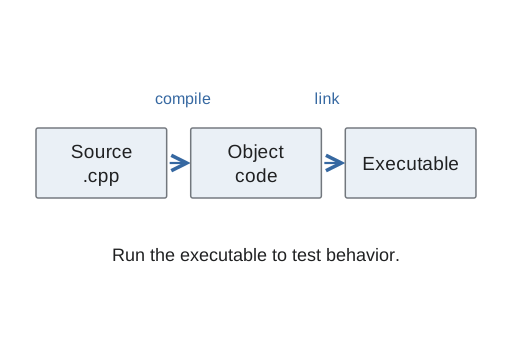
This lab connects a source file, a compiled executable, and a calculation whose expected answer can be worked out by hand. The mathematical task is signed percentage change. The programming task is to accept valid inputs, calculate carefully, repeat when requested, and summarize only accepted calculations.
Use CS1: compiling a program, CS1: arithmetic types, and CS1: input validation if those steps need review. The examples here are small reasoning checks, rather than private assignment solutions.
Keep the source and executable distinct #
The source file contains readable program instructions. A compiler translates the source and diagnoses certain errors. For example, g++ example.cpp -o example asks it to build an executable named example. The source path and output path must be different: the executable is not a replacement for the source text.[1]
The command ./example runs the executable in the current directory. Building and running are separate actions. A successful compiler command does not prove that the arithmetic is correct; it proves that the compiler accepted and produced a build under its checks.
Before interpreting a run, verify that the latest build succeeded. If compilation fails and an older executable remains, running that file can produce output from older code. That is not a test of the source you just edited. Keep the working folder and filenames clear so that you know which file was compiled and which executable is running.
Copying and moving files also serve different purposes. Copying normally leaves an original and another file; moving changes the file's location. Organize source and test records without confusing a relocated source file with a newly built executable.
Write the formula before the program #
For an old positive index and a new positive index, percentage change is (new - old) / old × 100. The numerator is the signed difference. The denominator is the original value, because the question measures change relative to that starting point.
From two hundred to two hundred ten, the difference is ten. Ten divided by two hundred is 0.05, and multiplying by one hundred gives five percent. From two hundred to one hundred ninety, the difference is minus ten, so the rate is minus five percent. The negative result represents a valid decline, not invalid input.
For unchanged positive indexes, the difference and rate are zero. That zero is also valid and belongs in later averages. It must not be dropped simply because a truth-value test treats zero as false.
The calculation contract can require both supplied indexes to be positive. In particular, the old index cannot be zero because it is the divisor. Enforce the input contract before performing the calculation, and explain which value was rejected rather than treating every negative output as an input failure.
Decide when floating-point arithmetic begins #
Integer division truncates a fraction when both division operands are integers. Assigning the quotient to a double afterward does not undo that truncation. For the increase above, integer ten divided by integer two hundred would yield zero before multiplication by one hundred.
Use floating-point operands when a fractional rate is required. During a dry run, record the difference, quotient, and final percentage separately. If the difference is right but the quotient has become zero unexpectedly, inspect the operand types at division before changing the formula.
Display formatting affects the text shown to the user, not the underlying meaning of the signed rate. Keep rounding for display separate from deciding whether an observation is valid.
Make repetition and the summary agree #
A repeated program needs a loop, a running sum, and an accepted count. After a valid pair produces one rate, add that rate to the sum and increase the count once. Rejected input must change neither summary quantity.
Suppose the accepted rates are five percent, minus five percent, and zero. The count is three, the sum is zero, and the average is zero divided by three: zero percent. Counting only positive rates would answer a different question and misrepresent the accepted observations.
When the accepted count is zero, no ordinary arithmetic average exists. Report that situation separately before dividing. A loop termination signal should not accidentally become another rate, and a failed parsing attempt should not contribute an uninitialized number.
Diagnose the first wrong stage #
A syntax error or undeclared name is a build-stage problem. An executable producing the wrong rate is a behavior problem. For the latter, inspect what was actually read, what was passed to the calculation, and the intermediate arithmetic.
Separate input, calculation, and output into suitable functions. The input part establishes preconditions. The calculation part returns the signed rate. The output part communicates it. This makes a direct calculation test possible without repeated interactive typing.
Document decisions that are easy to misread. For example, explain that a legitimate negative or zero rate still increases the accepted count. The useful invariant is that the sum and count describe the same accepted observations; a comment repeating an assignment word for word is less informative.
Practice and test plan #
Before running, predict the rate for an increase, a decrease, and unchanged values. Then test invalid or nonpositive input, one accepted pair, several pairs, and no accepted pairs. Check that rejection leaves the count unchanged and that the latest successful build produced the executable being tested.
If two valid pairs produce five and minus five percent, the accepted count is two and the average is zero. If a third pair is rejected, those summary values remain the same. This dry run checks both the formula and the agreement between sum and count.