
 The lecture encyclopedia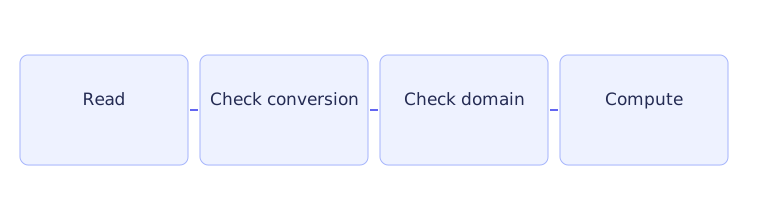
Reading a number from the console involves two questions. Did the entered text convert to a number? If it did, is that number acceptable for this calculation? These are different checks. The text ninety fails conversion; the numeric value zero may convert successfully but still be an invalid speed.
This article adds console input to the journey-time calculation and shows exactly where the program stops when input is rejected.
Understand the input and output streams #
std::cin >> value asks the input stream to read a value of the receiving variable's type. This operation is called extraction. For formatted numeric input, whitespace between numbers is normally skipped. std::cout << value sends a value to the output stream.
A stream keeps state indicating whether its operations succeeded. In a Boolean check, the stream reports whether it is free of a failure state.[1] Check extraction before computing with the result. Initializing a variable to zero prevents an uninitialized value, but it does not make failed input successful.
Output formatting is separate. std::fixed asks for fixed-point display, and std::setprecision(2) then requests two digits after the decimal point. Include <iomanip> for these manipulators. They change presentation, not the stored value's precision.
The complete input program #
Here distance must be nonnegative and speed must be positive. The program ends if either numeric extraction fails, rather than requesting another attempt. Stopping is a reasonable policy for a small calculator, provided the reason is clear.
#include <iostream>
#include <iomanip>

int main() {
    double distance{};
    double speed{};
    std::cout << "Distance and speed: ";
    if (!(std::cin >> distance >> speed)) {
        std::cerr << "Enter two numbers.\n";
        return 1;
    }
    if (distance < 0.0 || speed <= 0.0) {
        std::cerr << "Distance must be nonnegative; speed positive.\n";
        return 1;
    }
    std::cout << std::fixed << std::setprecision(2)
              << distance / speed << " hours\n";
}
The first two declarations initialize distance and speed to zero. The next statement prints Distance and speed: as a prompt. There is no newline in the prompt, so the entered text can appear on the same line.
The first if attempts to extract both numbers. Parentheses group the extraction, and ! negates its Boolean result: failed extraction makes the condition true. The error branch writes a message to std::cerr, the error stream, and returns status one. Returning from main stops this run, so the program does not reach the division.
Only after successful extraction does the second if check the values. Its condition accepts either reason for rejection: distance below zero, or speed less than or equal to zero. A successfully read zero speed therefore reaches this branch. The error message states the required ranges, and the return again prevents division.
If both checks pass, the output statement selects two-decimal-place formatting, evaluates distance divided by speed, and displays the result with its units. The statement continues on the next source line; the indentation makes that continuation easier to see. It is one output statement, not two separate calculations.
Trace ordinary and rejected input #
For 90 60, extraction stores 90 in distance and 60 in speed. Neither invalid-range condition is true. Division gives 1.5, and formatting displays 1.50 hours.
For 0 60, extraction succeeds. Zero is an accepted distance, and 60 is a positive speed. The quotient is zero, displayed as 0.00 hours. A zero distance and a zero speed have different roles in the formula, so they have different rules.
For 90 0, the text converts successfully. The second check finds that speed is not positive, prints the range message, and ends the run before division. For ninety 60, the first extraction fails to read a double. The first error branch runs, and the domain check is never reached.
Numeric extraction reads a number from the input stream; it does not validate an entire line as an indivisible answer. A more demanding input interface may need to read and check the full line. The policy here is to request two numeric values and check the stream and their allowed ranges.
When a program should ask again #
A menu may need to continue after invalid text. A failed stream does not repair itself when another extraction is attempted. First clear its failure state with std::cin.clear(), then discard the unwanted input through the next newline using std::cin.ignore(std::numeric_limits<std::streamsize>::max(), '\n'). This needs <limits>.
These actions do different jobs. Clearing allows the stream to attempt input again; ignoring removes the text that caused trouble. Without the second step, the next attempt can encounter the same unwanted characters. End-of-file should usually end the input loop, since repeatedly asking after the source is exhausted cannot produce new data.
Reading lines and stopping a sequence #
string input can include spaces. getline reads through a newline, whereas formatted extraction normally stops before a delimiter. After reading a number, a pending newline can make an immediately following line read appear empty.
For nonempty text where leading whitespace has no meaning, std::getline(std::cin >> std::ws, line) skips that whitespace before the line read. If an empty line or leading spaces are meaningful, handle the pending newline explicitly instead of discarding all leading whitespace.
A sentinel is a value chosen to mean stop, such as -1 for a sequence of nonnegative scores. Check for it before storing a score. It is a command to end the sequence, not one of the observations used in a mean.
Practice with explained answers #
For scores accepted from 0 through 100, test 50, 0, 100, 101, and malformed text. Fifty checks an ordinary valid case; zero and one hundred check the included boundaries. One hundred and one converts but fails the range check. Text fails conversion first. Successful extraction and score >= 0 && score <= 100 remain separate tests.
These choices prepare validation and stored observations in CS2 Lecture 4 and Lab 2, menu input in Lab 3, and line input in Lecture 10.