
 The lecture encyclopedia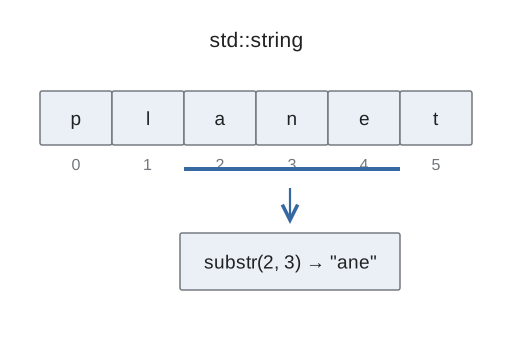
std::string owns a sequence of characters and manages the storage needed as its contents change. You can copy it, search it, and edit it without manually allocating a larger character array. That reduces ownership work, but valid indexes, search failures, and input delimiters still need attention.
Review CS1: characters and strings. The earlier C-string lecture explains the fixed array model; this one shows the operations supplied by the standard string type.
Build a value, then append deliberately #
Strings can be initialized from text, copied from other strings, and assigned new contents. The operator + creates concatenated text from compatible operands. The operator += appends to an existing string. Neither inserts spaces on your behalf.
std::string first = "Hello";
std::string message = first + " world";
message += "!";
First receives Hello. The second line combines first with a literal containing a leading space followed by world, so message becomes Hello world. First remains Hello: the concatenation created a result for the new string rather than modifying the original. The third line appends the exclamation mark, giving message the value Hello world!.
The leading space came from the literal, not from concatenation. Without that space, the words would meet directly. String literals are character arrays rather than std::string objects. Do not assume that two literal operands alone support every operation provided when a standard string participates in the expression.
An index counts from the first character #
For std::string month = "October", the positions are zero for O, one for c, two for t, three for o, four for b, five for e, and six for r. The stored value at index zero is O; at index four it is b. Seven is the length, not the index of a visible character.
The function at(i) checks whether the requested character exists and throws an out-of-range exception for an invalid index. operator[] does not provide that bounds-checking behavior. When accessing actual text characters, keep the index strictly below size().[1]
The functions length() and size report the same number of char elements. empty() checks whether that number is zero. An empty string has no visible character to inspect at index zero. Storage managed by the type does not turn an invalid position into a meaningful character.
Read a substring as start plus count #
substr(start, count) receives a starting position and a number of characters. The second argument is not the ending index. In month.substr(2, 4), begin at t, then take t, o, b, e. The new substring is tobe. Month itself remains October.
The operation can return fewer than the requested count when the remaining text is shorter. A start beyond the string's size is an error. Distinguishing start from count prevents off-by-one mistakes when extracting a word or suffix.
A substring is a new string value. It does not act as a permanent view that automatically follows later edits to the original. If you need a new extraction after editing the source text, reconsider the positions and perform the operation on its current contents.
Editing changes later positions #
Insertion adds characters at a selected position. Erasure removes a count beginning at a selected position. Replacement combines the idea of removing a segment and placing new text there.
For a separate string Hello World! with uppercase W, erasing six characters starting at index five removes the space and the five letters of World. The exclamation mark then follows Hello, producing Hello!. It is six removed characters, not an ending index of six.
After an edit, later indexes may identify different characters. If you recorded the exclamation mark's original index, that index does not magically update when earlier text is removed. Search again or calculate a new position from the current string before another access.
Choose token input or line input #
std::cin >> text reads a token, skipping leading whitespace and stopping at following whitespace. std::getline reads an entire line through its delimiter and preserves spaces inside that line.
When a prior numeric extraction leaves a newline in the stream, the next getline can consume that newline immediately and return an empty string. This is not proof that getline cannot read spaces. It means the next available delimiter already ended the line. Handle the pending input according to the program's intended format; discarding all leading whitespace would also discard meaningful spaces or blank lines if those matter.
A failed search is not a character position #
Search functions return either a position or std::string::npos, a sentinel meaning no match was found. Check it before passing the result to indexing or substring extraction. A not-found result is not a special character at the end of the text.
Standard-string comparisons examine the text lexicographically, rather than comparing pointer addresses. As with character-based C-string comparison, this ordering should not be assumed to solve every locale-aware language-sorting task.
Practice and explanation #
What does the count four mean in month.substr(2, 4)? Take up to four characters starting at index two, yielding tobe in this example. It does not mean stop at index four.
If find reports npos, should you immediately use it as a subscript? No. Handle the missing match before accessing a position. The string manages storage, while your program remains responsible for the meaning and validity of the requested operation.