
 The lecture encyclopedia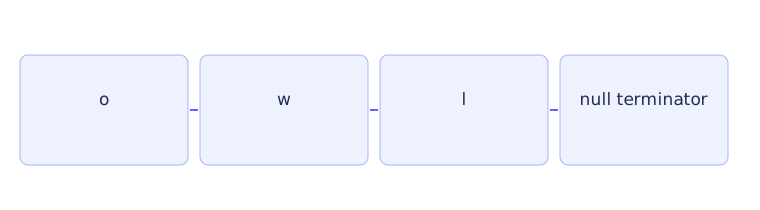
Text is stored as a sequence, but different text types manage that sequence differently. A char holds one code unit. A C-style string uses a character array with a special ending marker. A std::string keeps track of its length and storage for you. Identify the representation before deciding how to read, copy, compare, or edit text.
One character and a sequence of characters #
Single quotes make a character literal, such as 'a'. Double quotes make a string literal, such as "a". They may look similar on the screen, but they describe different data. The first is one character value. The second supplies an array containing the letter and an ending marker.
A code unit is one stored piece of an encoding. For simple examples here, one letter occupies one byte. That is not a general rule for human-visible characters: UTF-8 text can use several bytes for one displayed character. Moving forward by one byte may therefore move into the middle of an encoded character. These examples teach byte-oriented operations, rather than a complete model of international text.
Character classification asks a question about a character. For example, std::isdigit asks whether a value represents a digit under its classification rules. It does not turn a whole field such as "123" into the integer 123. For a potentially negative plain char, convert to unsigned char before passing it to a <cctype> classification function. This satisfies the function's accepted argument range for stored byte values.
Where a C string ends #
A C string ends at the null character, written \0. This marker has numeric value zero. It is distinct from the visible digit character '0'.
Consider char word[] = "owl";. Its four array elements are o, w, l, and the marker. Its text length is three, but it needs capacity for four elements. Length counts text characters before the marker; capacity describes available storage. A character array can exist without this marker, but it is then not a valid C string for operations that expect one.
A C-string function commonly scans until the marker. If the marker is missing, it cannot infer the array's boundary from the pointer it receives. Supplying valid terminated inputs and enough destination room is the caller's responsibility. When copying three letters, leave room for the fourth element that ends the copied string.
Built-in arrays do not support assignment that copies an entire array after its declaration. Also, comparing two pointer addresses asks whether they point to the same location, not whether the sequences at those locations contain the same letters. C-string comparison functions inspect character contents under their own input requirements. These distinctions matter in CS2 Lecture 9.
Follow the string program #
A std::string owns its text storage and knows its length. Assignment copies the text value, + concatenates strings, and comparison follows lexicographic order: compare corresponding characters until a difference or an ending decides the result. Positions still need to be valid.[1]
#include <iostream>
#include <string>

int main() {
    std::string text = "planet";
    const auto position = text.find("net");
    if (position != std::string::npos) {
        std::cout << text.substr(position, 3) << '\n';
    }
    text.replace(0, 2, "PL");
    std::cout << text << '\n';
}
First, text receives the value "planet". Its positions are 0 for p, 1 for l, 2 for a, 3 for n, 4 for e, and 5 for t. find("net") searches for that entire consecutive sequence. It begins at position 3, so position receives 3.
A failed search would return std::string::npos, a special value meaning no position was found. The condition checks for that failure result before using the position. It does not rely on zero meaning failure: a successful match can begin at position 0.
Inside the branch, text.substr(position, 3) starts at position 3 and takes three characters, producing "net". It returns a string value without changing text. Its second argument is a count, not a final index. The first output line is therefore net, while the original string remains "planet".
Then text.replace(0, 2, "PL") changes the original string. Starting at position 0, it removes two characters and inserts "PL". Those removed characters are p and l. The remaining "anet" stays after the replacement, making the second output PLanet.
Read a token or a line #
std::cin >> name extracts one whitespace-delimited token. With input Ada Lovelace, it reads Ada and leaves the following input for another operation. std::getline(std::cin, name) can instead read a line containing spaces, stopping at the newline.
Combining token extraction and line input requires checking what remains in the stream. An extraction may leave its delimiter, so a following line read can encounter the pending newline immediately and produce an empty line. Resolve that pending delimiter deliberately. Do not discard an arbitrary character if it might be actual input. The right approach depends on whether the remainder of the current line is useful or should be discarded.
Search for a set or a substring #
find_first_of("aeiou") asks for the first character belonging to the set a, e, i, o, u. On "planet", the a at position 2 qualifies. It does not search for the five-character sequence "aeiou".
find_first_not_of asks the opposite question: where is the first character outside the supplied set? With the same vowel set and "planet", position 0 qualifies because p is not a vowel. Both kinds of search can fail, so check for npos before treating their results as positions. This distinction supports the character-set searches in CS2 Lecture 11.
Practice with explained answers #
char code[] = "go"; contains three elements: g, o, and the ending marker. It has two text characters. std::string("planet").substr(2, 3) gives ane: start at a, then take a total of three characters.
If a search misses, take a separate not-found branch before accessing or editing at its result. If you copy one std::string into another and then replace characters in the copy, the original keeps its value. Comparing that value-copy behavior with copied character pointers will help with CS2 Lectures 9, 10, and 11.