
 The lecture encyclopedia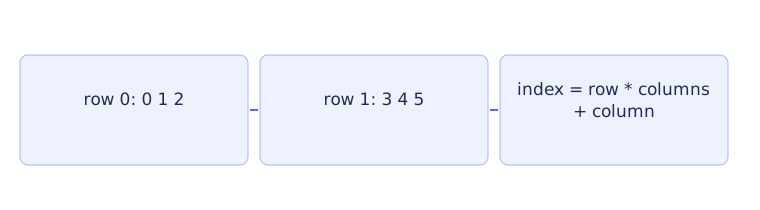
A grid stores values addressed by more than one coordinate. Imagine a small table: a row chooses a horizontal line and a column chooses a position within that line. Before writing a loop, say what each coordinate means and how many positions it can take. This prevents a row number from accidentally being used as a column number.
A two-dimensional array is an array whose elements are themselves arrays. For int grid[2][3], there are two rows, each containing three integers. That gives six integers in all, not two independent lists with unknown lengths.
Visit the cells in execution order #
Row indices are 0 and 1. Column indices are 0, 1, and 2. A valid coordinate must satisfy both limits: the row is less than 2 and the column is less than 3. C++ built-in array access does not perform these bounds checks for you.[1]
#include <iostream>

int main() {
    constexpr int rows = 2;
    constexpr int columns = 3;
    int grid[rows][columns]{};
    for (int row = 0; row < rows; ++row) {
        for (int column = 0; column < columns; ++column) {
            grid[row][column] = 10 * row + column;
            std::cout << grid[row][column] << ' ';
        }
        std::cout << '\n';
    }
}
rows and columns name the two extents. They are constants, so their values stay 2 and 3 throughout this program. The empty braces initialize the grid's integers to zero before the loops start. The assignment inside the loops then replaces each cell with a calculated value.
Begin at the outer loop. Its row starts at 0. Because 0 is less than 2, execution enters the outer loop's body. That body contains the entire inner loop. The inner loop declares column with value 0, then visits columns 0, 1, and 2.
At row 0 and column 0, 10 * row + column is 10 * 0 + 0, so the cell becomes 0. The next cell becomes 1, and the next becomes 2. Each assignment is followed by printing that cell and a space. When column becomes 3, the inner condition fails. The inner loop finishes, and the newline statement prints the end of the first output row.
Now the outer loop increments row to 1. Execution reaches the inner loop again, and its declaration starts a new column at 0. The values calculated this time are 10, 11, and 12. Another newline completes the second output row. Finally row becomes 2, making the outer condition false. The printed rows are 0 1 2 and 10 11 12.
The important reset is inside the outer loop. If a column counter stayed at 3 after finishing row 0 and were never reset, the next row's inner loop would have no valid iterations. Nesting the inner loop's initialization makes every row start with its first column.
Shape matters when passing an array #
An interface such as void print(const int grid[][3], int rows) retains the column extent 3. Each row occupies space for three integers, and that information is needed to locate the next row. The supplied rows count tells the function how many rows to traverse. It must fit the actual argument; omitting the first written extent does not make every row count safe.
This layout differs from a collection of separately allocated row pointers. In the built-in grid, rows are part of one contiguous array object. In a separately allocated arrangement, one pointer can identify each row's independent allocation. That model needs different access and cleanup reasoning, which CS2 Lecture 8 develops. A pointer to the first kind of grid is not automatically interchangeable with a pointer to the second.
You can also use one flat array for the same cells. The offset for row r and column c is r * columns + c. With three columns, row 0 occupies offsets 0 through 2, and row 1 occupies offsets 3 through 5. Check both coordinates before using the formula. Computing an offset does not establish that the coordinates were valid.
For a three-dimensional layout, a property index p might choose a property within a cell. If each cell has properties entries, its offset is (r * columns + c) * properties + p. Read it in stages: locate the cell, move past the preceding cells' properties, then choose this cell's property. Check all three indices. Names such as STATE, AGE, and YIELD explain what property numbers mean. A structure can instead give each property a named member.
Read old state, write new state #
A simulation changes stored values according to a rule. Some rules require every cell to read the same previous time step. In that case, keep an old grid for reads and a next grid for writes. Finish calculating the next grid before replacing the old one.
For example, consider a row [0, 10, 0] where a new interior value is the average of its two old neighbors. The middle cell's new value is 0. If other updates first changed a neighbor in the same array, the middle cell might instead read a new value and produce a different answer. That is a different update rule, rather than merely a faster version of the original one.
Boundary behavior also belongs to the rule. A corner does not have every neighbor an interior cell has. Decide whether absent neighbors are ignored, treated as fixed values, or reached by wrapping around the grid. Check existence before access; reading an out-of-range neighbor is not a way to supply a default.
Practice with explained answers #
In a 2 by 3 grid, row 1 and column 2 map to 1 * 3 + 2, which is flat index 5. Flat index 4 maps back to row 4 / 3, or 1, and column 4 % 3, or 1. Division counts complete rows; the remainder identifies the position within a row.
Why is row 2, column 0 invalid here, even though the offset formula gives a number? There are only rows 0 and 1. The formula gives offset 6, just beyond the six-element allocation, and cannot create another cell. These checks prepare multidimensional arrays in CS2 Lecture 5, separate-row allocation in Lecture 8, and the three-dimensional grid in Lab 5.